How to enable PHP Extensions

You can easily enable any PHP modules extensions yourself in cPanel.

Please follow the steps below:
  1. Log into cPanel
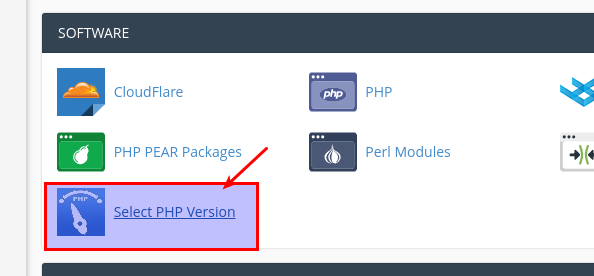
  2. Go to "SELECT PHP Version" in "Software"
    Select PHP Version

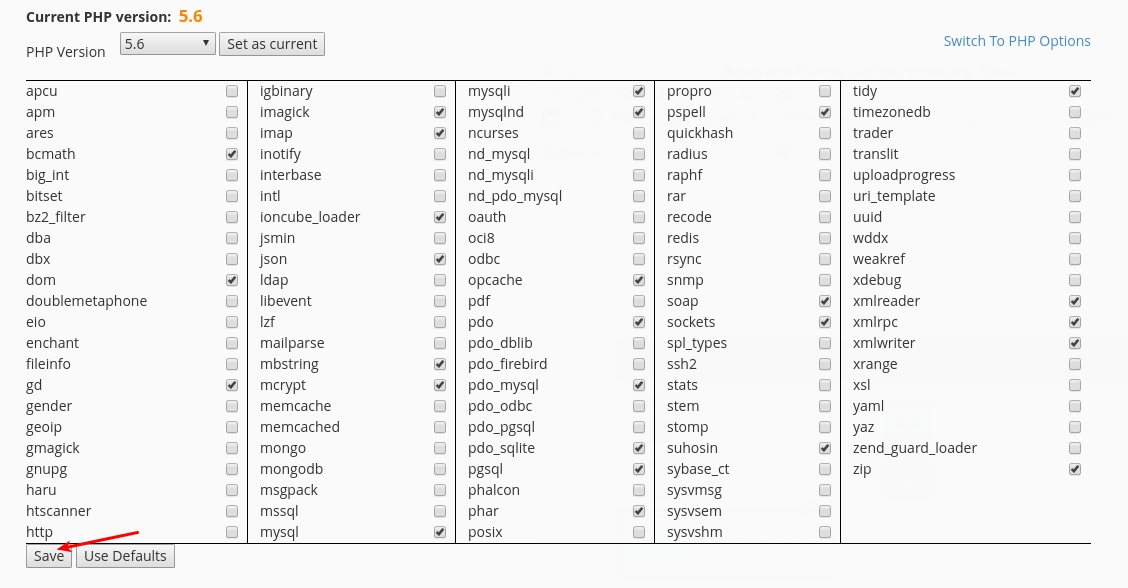
  3. On this page you can enable any PHP Extension your website requires.  After you select the extensions you will need to click "Save".
    Enable PHP Extensions


  • 844 Los Usuarios han Encontrado Esto Útil
¿Fue útil la respuesta?

Related Articles

What is the difference between ecommerce web hosting and standard web hosting?

We offer standard web hosting and Ecommerce web hosting. Below is a summary of the differences:...

How do I update my credit card on my account?

You can update your credit card by logging into your client area and go to Billing -> Manage...

Forbidden Error

When I access my new hosting account, I get the page "Forbidden".If you see this error, please...

Do I need a reseller account?

We generally recommend you to have a reseller account if you meet one of the following criteria:...

Terms and Conditions

You can view our terms and conditions HERE . You can view our Acceptable Use Policy HERE .