How to enable ImageMagick PHP Extension

To enable ImageMagick, you need to do the following:
  1. Log into cPanel
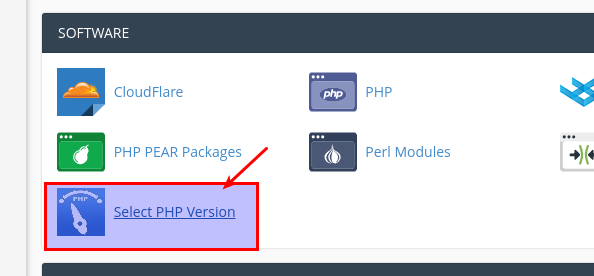
  2. Go to Select PHP Version
    Select PHP Version
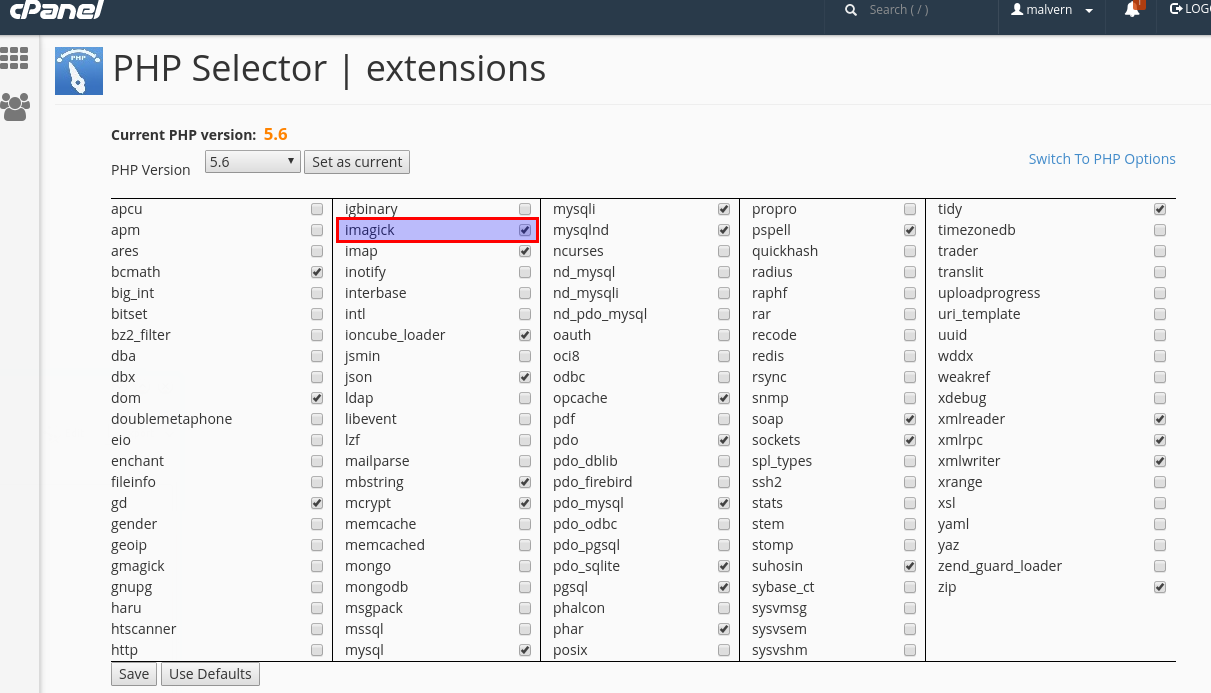
  3. Here you should be able to enable the 'imagick' PHP extension.  Don't forget to 'Save'.

 Enable PHP Imagick

  • 603 brukere syntes dette svaret var til hjelp
Var dette svaret til hjelp?

Related Articles

How to enable PHP Extensions

You can easily enable any PHP modules extensions yourself in cPanel.Please follow the steps...

Forbidden Error

When I access my new hosting account, I get the page "Forbidden".If you see this error, please...

400 Bad Request, Your browser sent a request that this server could not understand

I am getting the following apache 400 error:"Bad Request, Your browser sent a request that this...

Nameservers

Please use the following namservers for your domain:   ns1.hostmaster.com.au...

How do I update my credit card on my account?

You can update your credit card by logging into your client area and go to Billing -> Manage...