How to enable ImageMagick PHP Extension

To enable ImageMagick, you need to do the following:
  1. Log into cPanel
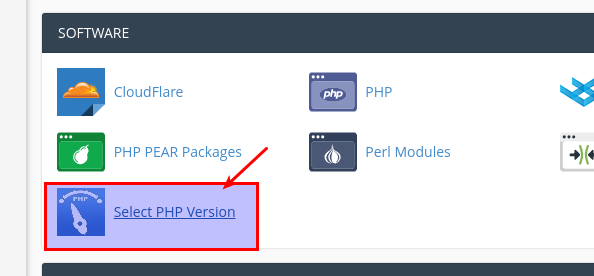
  2. Go to Select PHP Version
    Select PHP Version
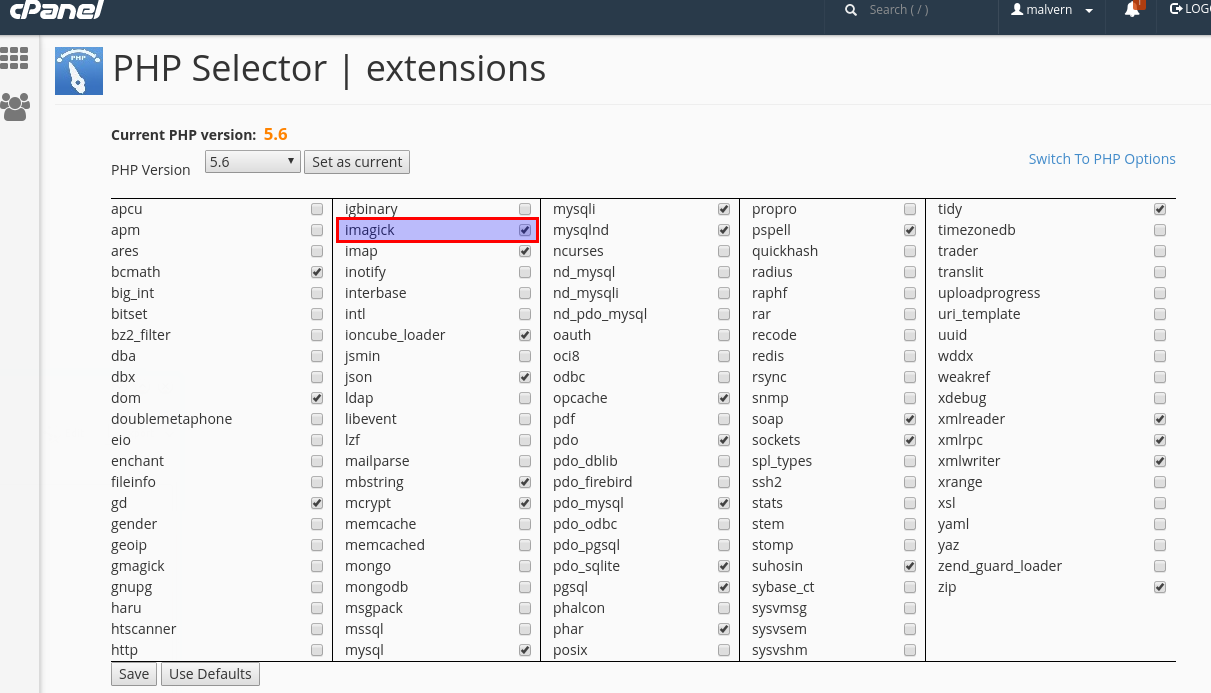
  3. Here you should be able to enable the 'imagick' PHP extension.  Don't forget to 'Save'.

 Enable PHP Imagick

  • 603 Korisnici koji smatraju članak korisnim
Je li Vam ovaj odgovor pomogao?

Related Articles

Nameservers

Please use the following namservers for your domain:   ns1.hostmaster.com.au...

What is a domain name?

A domain is an address for your website on the internet.  They should be something that is easy...

What is the difference between ecommerce web hosting and standard web hosting?

We offer standard web hosting and Ecommerce web hosting. Below is a summary of the differences:...

How to find out my account disk usage and what is using up all the disk space?

To find out your account's disk usage and usage information, please following the following blog...

Terms and Conditions

You can view our terms and conditions HERE . You can view our Acceptable Use Policy HERE .